Mobile scanner and PDF manager for Android document workflows
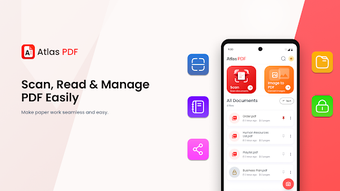
Atlas PDF: Scanner & Reader from Midas Studio App is an Android productivity app designed to digitize paperwork for mobile workflows. The app functions as a camera scanner, PDF creator, and reader, enabling multi-page capture, smart cropping, and in-app viewing with text search and zoom. Key built-in features include automatic edge detection, password protection, file organization, and direct sharing to email and cloud. It targets students, office professionals, and small business owners who need quick document capture and management on the move.
What is Atlas PDF used for?
Atlas is built to turn paper documents into usable digital files for mobile professionals. The app serves as a camera scanner, PDF creator, and document reader able to capture receipts, contracts, IDs, and notes. It applies automatic edge detection and high-quality image processing to produce aligned, legible scans suitable for record-keeping or on-the-go review without manual cropping.
How does Atlas manage multi-page capture and export?
The core scanning workflow focuses on quick capture and assembly into multi-page PDFs. Users scan successive pages, then use smart cropping and adjustment tools to refine each image before export. Output options include creating a single PDF and direct sharing to email, messaging apps, or cloud storage. Typical steps are:
- capture with camera
- apply smart crop and adjustments
- combine into multi-page PDF
- share or save to storage
Can professionals keep sensitive files private with Atlas?
The app includes built-in password protection for confidential PDFs and a file management area for renaming, moving, and sorting documents. That combination supports small teams or solo consultants who handle invoices or contracts on mobile devices. Because privacy tools are native to the app, users can secure documents without switching to a separate utility, which reduces steps in a contract or compliance workflow.
How well does the reader perform with large files and search tasks?
The integrated PDF viewer is described as fast and smooth, with zoom controls and a text search function that helps locate passages inside documents. The app is reported to handle large PDF files smoothly, which suits lengthy manuals or multi-page reports. Designed for modern Android devices, the reader keeps navigation responsive during scrolling and search-driven review sessions.
Atlas suits mobile-first professionals but limits cross-device desktop use
Atlas is a practical choice for mobile-first professionals who need focused document workflows on a single device. Its Android-only availability constrains teams that require native desktop integration or cross-platform clients. Ultimately, the app fits users who prioritize fast, local capture and management on Android devices; groups needing broader cross-device distribution should consider alternatives.